Key Takeaways
- 01Plants that deploy real-time KPI dashboards on the floor report defect reductions of up to 41% and unplanned downtime reductions of up to 20%
- 02Internal communication effectiveness climbs over 50% after networked displays are installed in production areas
- 03Real-time safety alerts delivered via digital signage reduce safety incidents by as much as 20% compared to static signage
- 04ERP and MES integration is the single highest-value feature of plant floor digital signage — it eliminates manual data entry and ensures displays are always current
- 05IP-rated enclosures (IP54 or higher) are required for displays in environments with dust, moisture, or chemical exposure
Why the Plant Floor Is a Digital Signage Priority
Most manufacturing facilities have invested heavily in enterprise software — ERP systems, MES platforms, SCADA dashboards, quality management tools. The data exists. The problem is that the people who need it most — operators, line supervisors, and safety personnel — are standing on a production floor with no access to a computer screen.
The traditional solution has been printed shift boards, whiteboard KPIs, and verbal handoffs at shift change. These methods are slow, error-prone, and invisible to workers at the far end of a production line. When a machine goes down, when a safety threshold is crossed, or when a shift target is missed, the information takes minutes or hours to reach the people who can act on it.
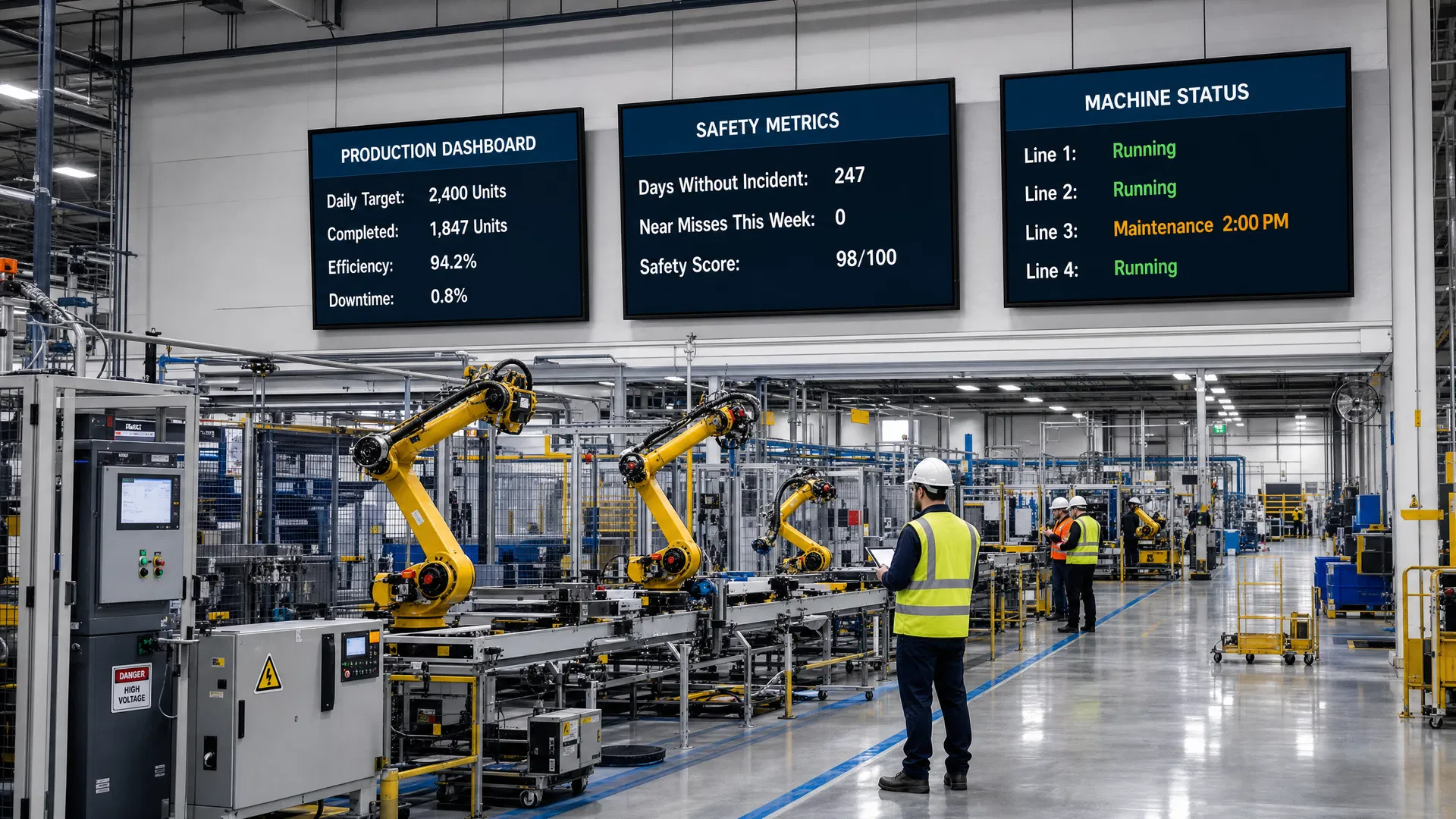
Plant floor digital signage closes this gap. Networked displays mounted at production lines, in break rooms, at entry points, and near equipment deliver real-time data from your existing systems directly to the people who need it — without requiring them to leave their workstation or log into a system. The result is a measurable improvement in communication effectiveness, safety performance, and operational efficiency.
Key Stat
Plants that deploy real-time KPI dashboards on the floor report internal communication effectiveness improvements of over 50% and defect reductions of up to 41%. — Industry benchmarks, Digital Signage Federation
OEE Dashboards: Real-Time Production KPIs on the Floor
Overall Equipment Effectiveness (OEE) is the gold standard metric for manufacturing productivity, combining availability, performance, and quality into a single score. The challenge with OEE is that it's only actionable when it's visible in real time — not in a weekly report reviewed in a conference room.
Plant floor digital signage transforms OEE from a lagging indicator into a live operational tool. Displays mounted at each production line show current OEE scores, target vs. actual output, cycle time, reject rates, and downtime events as they happen. When a line falls below target, supervisors and operators see it immediately and can respond before the shift ends.
The most effective OEE dashboard deployments use color-coded visual alerts — green for on-target, amber for approaching threshold, red for below target — that communicate status at a glance from 30+ feet away. This design principle, borrowed from industrial HMI design, ensures that a worker walking past a display can assess line health in under two seconds without stopping to read detailed data.
Pro Tip
Pro Tip: Design OEE displays for 30-foot readability. Use large fonts (minimum 48pt for primary metrics), high-contrast color coding, and limit each screen to 3–5 KPIs. Detailed data belongs in the MES, not on the floor display.
- Availability: Planned production time minus downtime, expressed as a percentage. Display with a real-time countdown to next planned maintenance.
- Performance: Actual output vs. ideal output rate. Show both current cycle time and the gap to standard cycle time.
- Quality: First-pass yield and reject rate. Flag when reject rate crosses threshold with an amber or red alert.
- OEE Score: The composite metric. Color-code against world-class benchmark (85%) and your facility's internal target.
- Shift Progress: Actual units vs. shift target with a projected end-of-shift total based on current rate.
Safety Compliance Displays and OSHA Messaging
Safety communication is one of the highest-stakes use cases for plant floor digital signage. OSHA requires that safety information be communicated clearly and consistently to all workers — and static posters that fade into the background after a few weeks of exposure are a compliance risk, not a solution.
Digital signage addresses this in two ways: scheduled safety content and real-time alert overrides. Scheduled safety content rotates OSHA-required messaging, PPE reminders, emergency procedures, and safety milestone recognition (days without incident) through a content playlist that ensures every worker sees critical information regularly. Real-time alert overrides allow safety managers to push emergency alerts — chemical spill, evacuation order, equipment lockout — to every display on the floor simultaneously, overriding all other content until the alert is cleared.
The measurable impact is significant. Real-time safety alerts delivered via digital signage reduce safety incidents by as much as 20% compared to facilities relying on static signage and PA announcements alone. For facilities subject to OSHA inspections, documented digital safety communication programs also demonstrate a proactive compliance posture that can reduce citation risk.
Key Stat
Real-time safety alerts delivered via plant floor digital signage reduce safety incidents by up to 20% compared to static signage. — Occupational Safety research benchmarks
- Emergency Alert Override: One-click broadcast to all floor displays for evacuations, lockouts, and hazmat events.
- Days Without Incident Counter: A visible, real-time safety milestone display that reinforces safety culture.
- PPE Compliance Reminders: Zone-specific PPE requirements displayed at entry points to each production area.
- OSHA Recordable Rate: Transparency about safety performance builds accountability at all levels.
- Near-Miss Reporting Prompts: Regular reminders to report near-misses, with QR code links to reporting systems.
Shift Communication Boards and Workforce Engagement
Shift handoffs are one of the most information-dense moments in any manufacturing operation — and one of the most error-prone. When outgoing supervisors verbally brief incoming teams, critical information about equipment status, quality issues, and production targets gets lost, misremembered, or simply not communicated.
Digital shift communication boards replace the verbal handoff with a structured, visible, and persistent information display. Incoming shift workers see the current production status, any open maintenance tickets, quality alerts from the previous shift, and the day's targets before they take their first step onto the floor. The information is pulled automatically from your MES and maintenance management systems, so it's always current and requires no manual update from the outgoing supervisor.
Beyond shift handoffs, plant floor displays serve as a channel for workforce engagement content that improves morale and retention. Employee recognition, safety milestone celebrations, training announcements, and company news give workers a sense of connection to the broader organization — particularly important in facilities where workers rarely interact with management or have access to company intranets.
ERP and MES Integration: Live Data Without Manual Entry
The highest-value feature of plant floor digital signage is not the displays themselves — it's the integration with your existing data systems. A display that shows manually updated numbers is only marginally better than a whiteboard. A display that pulls live data from your ERP, MES, SCADA, or quality management system is a force multiplier for every operational decision made on the floor.
Modern digital signage CMS platforms support integration with all major manufacturing systems through standard APIs, OPC-UA connections, database queries, and data connectors. SAP, Oracle, Microsoft Dynamics, Epicor, Infor, and most major MES platforms can feed data directly to floor displays without custom development. The configuration is typically done through the CMS interface, not by your IT team writing integration code.
80% of companies that implement real-time data analytics report a measurable revenue or efficiency improvement, and the plant floor display is the last-mile delivery mechanism that makes that data actionable for the workers who can act on it.
Pro Tip
Integration Checklist: Before specifying a CMS platform, confirm it supports your specific ERP/MES version via native connector or documented API. Request a proof-of-concept data feed during the evaluation process — not just a demo with static data.
| System Type | Common Platforms | Data Available for Display |
|---|---|---|
| ERP | SAP, Oracle, Microsoft Dynamics, Epicor | Production orders, inventory levels, labor hours, cost variances |
| MES | Rockwell FactoryTalk, Siemens Opcenter, Infor | Real-time OEE, cycle time, reject rates, work order status |
| SCADA/PLC | Ignition, Wonderware, Siemens WinCC | Machine status, sensor readings, alarm states, energy consumption |
| CMMS | Maximo, SAP PM, Fiix, eMaint | Open work orders, PM schedules, equipment downtime history |
| QMS | ETQ, MasterControl, Intelex | First-pass yield, NCR counts, audit findings, corrective actions |
Hardware Requirements for Industrial Environments
Commercial-grade displays designed for office or retail environments are not suitable for most manufacturing plant floors. The combination of dust, moisture, temperature extremes, vibration, and high ambient light levels requires hardware specified for industrial use.
The key specification to understand is IP (Ingress Protection) rating. IP54 provides protection against dust ingress and water splashing from any direction — the minimum acceptable rating for most production floor environments. IP65 provides complete dust-tight protection and resistance to water jets, appropriate for food processing, chemical manufacturing, and washdown environments. IP66 and IP67 ratings are required for high-pressure washdown applications.
Beyond IP rating, industrial display specifications should include: operating temperature range (standard commercial displays are rated to 40°C; industrial environments may require 50°C or higher), anti-glare treatment for high-ambient-light areas, high-brightness panels (1,000–2,500 nits) for areas with direct sunlight or strong overhead lighting, and shock/vibration resistance ratings for areas near heavy machinery.
- IP54 minimum for standard production floor environments with dust and incidental moisture.
- IP65 or IP66 for food processing, chemical manufacturing, and washdown environments.
- 1,000+ nit brightness for areas with high ambient light or near windows.
- Operating temp range of at least -10°C to 50°C for environments near furnaces, freezers, or outdoor exposure.
- Anti-glare treatment to maintain readability under overhead industrial lighting.
- Fanless design where possible to reduce maintenance requirements and failure points in dusty environments.
Implementation: From Pilot to Plant-Wide Deployment
The most successful plant floor digital signage deployments follow a phased implementation approach that proves value at small scale before committing to a full facility rollout. A well-structured pilot typically involves 3–5 displays in a single production area, integrated with one data source (usually the MES or ERP), and measured against a defined set of KPIs over a 60–90 day period.
The pilot phase serves two purposes: it validates the technical integration with your specific systems and it builds internal advocacy. When a line supervisor sees their OEE score on a display and can point to a measurable improvement in shift performance, they become the most effective advocate for expanding the program to the rest of the facility.
Coffman Media's manufacturing deployments follow a five-step process: site survey and environment assessment, hardware specification and network planning, CMS selection and data integration configuration, installation and commissioning, and staff training and content management handoff. The entire process from contract to go-live typically takes 6–10 weeks for a pilot deployment and 12–20 weeks for a full facility rollout.
Pro Tip
Start with your highest-visibility bottleneck. The production line with the most downtime, the highest reject rate, or the most frequent shift communication failures is the right place to pilot plant floor digital signage. Visible results in a problem area build the business case for facility-wide deployment faster than any ROI model.
Frequently Asked Questions
Answers to the most common questions about industry insights in digital signage.
Plant floor digital signage refers to networked display systems installed in manufacturing facilities to communicate real-time operational data, safety information, and workforce communications directly to production workers. Unlike office digital signage, plant floor systems are typically integrated with ERP, MES, and SCADA systems to display live production KPIs, OEE scores, safety alerts, and shift information without manual data entry.

About the Author
Eric Madden
Co-Founder & CTO, Coffman Media
Eric Madden is Co-Founder and CTO of Coffman Media. He oversees the technical architecture of digital signage deployments, including network design, CMS integration, and hardware specification. Eric's engineering background underpins Coffman Media's reputation for technically sound, scalable signage systems.
Connect on LinkedInWork With Coffman Media
Ready to Transform Your Screens Into Powerful Messages?
Coffman Media designs, installs, and manages end-to-end digital signage systems for enterprise, retail, healthcare, and education. From a single display to a nationwide network, we deliver solutions that drive real results.